CHANEY LAW FIRM BLOG

Subscribe to our Blog

How to read .ptx transcript files on your Mac - Yosemite update

Last year I wrote up a how-to guide installing a .ptx viewer on a Mac for Mavericks and previous versions of OS X. Some steps in that process changed in Yosemite, so here are the steps.

Remember, this is a fairly involved process that takes tinkering under the hood of your Mac. Make sure you're comfortable using the command line. Some of the commands will take a while to run, so it's best to try and multitask while this is going on.

First, install XCode from the App Store. Then, open the Terminal applications (found at /Applications/Utilities/) and run the following command, which installs some command line tools you'll need:

xcode-select --install

Run the following command to agree to the XCode license:

sudo xcodebuild -license

Scroll to the end using the spacebar and type 'agree' to accept the license.

Next, you'll need the Macports package installation manager, available here. Choose the version that corresponds to your operating system, and install the package. When it's finished, run the following command to update Macports to the latest release (warning: this step can take a while, because it has to compile a bunch of code):

sudo port -v selfupdate

You'll also want to upgrade the installed ports (which can also take a while), as follows:

sudo port upgrade outdated

After this, you'll want to make sure MacPorts knows where to look for its files, which are in the /opt directory. Run this line of code to do so (H/T David Baumgold, whose great Wine on Mac tutorial I just discovered):

echo export PATH=/opt/local/bin:/opt/local/sbin:\$PATH$'\n'export MANPATH=/opt/local/man:\$MANPATH | sudo tee -a /etc/profile

Next, we'll use Macports to install Wine:

sudo port install wine

This will take a few minutes for the files to download, compile, and install. After that, we'll have to install a couple of extensions for wine: (1) Mono, an open source version of the .NET framework; (2) a helper application, winetricks; and (3) Windows Media Player. (1) and (3) are required by E-Transcript Viewer 6.2, and (2) installs (3).

sudo port install mono
sudo port install winetricks
winetricks wmp10

During this process, you're going to have some Windows windows pop up, as you would when installing software on a Windows machine. Make the appropriate selections (the default, preferably) to install the software. 

Then, download and install the e-Transcript Viewer app, available here. Download the file, then type the following commands into your Terminal: as follows:

cd ~/Downloads
wine E-Transcript_Bundle_Viewer-6.2.exe

(Pro tip: when you're typing a file name into the Terminal, you can hit the tab key to auto-complete the name). Once you run this program, you'll get a popup telling you to install a couple of prerequisites. Click 'Install'. Check the default values for installation of the E-Transcript Viewer, and complete the installation.

Finally, we'll need to create a shortcut to the installed E-Transcript Viewer application, which is hidden. Open the TextEdit application, and click New Document. Copy and paste the following lines into the document:

#!/bin/sh
wine ~/.wine/drive_c/Program\ Files/RealLegal/E-Bundle\ Viewer/EBundleViewer.exe

Click Format > Make Plain Text. Save the file in the Applications Folder as "E-Transcript Viewer.command". Finally, go back to the Terminal window and enter the following commands so that the script we just created can be executed:

chmod +x /Applications/E-Transcript\ Viewer.command

Now, you should be able to double-click the 'E-Transcript Viewer.command' file in the Applications folder any time you need to open a .ptx file. Here's the result:

withers-depo.png

If you get stuck at any point in the process, please let me know in the comments and I'll try to help. You can also holler at me @chaneylawfirm on Twitter. We'd also appreciate a follow on our blog at http://www.chaneylaw.com/blog if you found the tutorial helpful, as I put these out from time to time. Thanks for reading.

UPDATED 6-25-2015: Genericized the home directory in the bash script per the comments.

How-to: Hyperlinks in federal court documents on a Mac

I follow Hercules and the Empire, a blog written by a federal trial judge in Nebraska. I was poking around the archives today and found a couple of gems on legal writing, including a list of "Top ten legal writing hints when the audience is a cranky federal trial judge". Judge Kopf suggests we make life easier on law clerks by inserting hyperlinks to caselaw and the electronic record.

I appreciate good legal writing, so I immediately started exploring the process. The Nebraska USDC ECF page has several links and tutorials on how to create hyperlinks in e-filed documents. The tutorials are a really good starting place on the mechanics of how to create hyperlinks. For instance, I never knew you could link to particular pages of PDF documents online simply by adding ?page=<pagenumber> to the end of the link. However, the tutorials identified a few issues that our particular Mac-based workflow would cause, so I thought I'd write up how I addressed the problems.

We use Macs and Microsoft Word in our office. We have Adobe Acrobat 11. Lexis is our legal research provider. From what I can tell, this setup creates at least two issues that requires alternative solutions to that posted in the Nebraska USDC hyperlink manual.

Problem 1: Clean Lexis Links

Solution: Use the Copy with Cite link from your Lexis case page to get a permalink to the document.

Pro Tip: Instead of the page number of the beginning of the opinion, you can use the page number for the pinpoint cite. So, instead of: "http://www.lexis.com/research/xlink?app=00075&view=full&searchtype=le&search=347+Ark.+423", the last part becomes "347+Ark.+429".

Explanation: For Lexis links, the tutorial suggests copying and pasting the link from the address bar in the browser; however, the tutorial also notes some attorneys have difficulty using this method. In looking at the url for a case I pulled up in Lexis, I can tell it will cause problems simply because it contains a lot of HTTP session information that will expire in a few hours.

The hyperlink needs a permanent link to the Lexis document. The workaround is to click the (Copy w/ Cite) link at the top of the Lexis page for your document. This will open a popup window. Make sure the Copy reference as hyperlink box is checked, and you can then click the text and copy the citation with the hyperlink embedded. Here's a screenshot showing the Copy w/ Cite link and the popup:

Screen Shot 2015-05-13 at 09.26.25.png

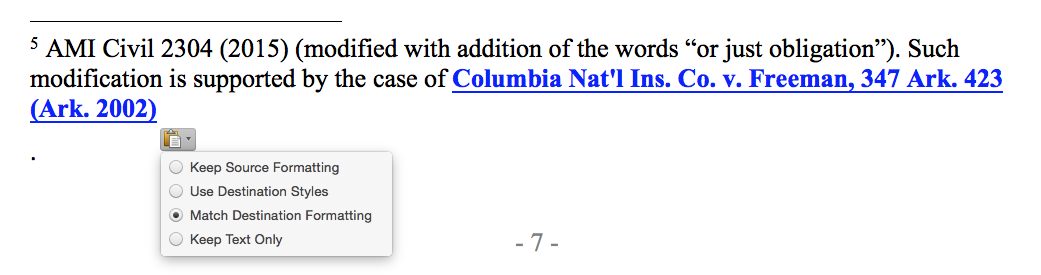
When you paste into Word, you might have to click the little clipboard icon that pops up and select "Match destination formatting...", like this:

You'll need to work on the cite to get it in Bluebook format (de-bold and italicize the caption), unless your an anarchist. This will give you a permanent link to Lexis in your Word document.

Problem 2: Exporting Links to PDF

Solution: This requires a couple of different workarounds for me, as follows:

  • Upgrade Adobe Acrobat to version 2015 (this is the Document Cloud version).
  • Use File > Save As Adobe PDF... in Word 2011, not Word 2016 Preview.
  • Don't put hyperlinks in footnotes for now.

Explanation: While reading through the Nebraska USDC tutorial, I saw that you can't simply do a File > Print > Save as PDF from Word because it doesn't preserve the links. I tried it, and sure enough, the links didn't work. I also tried the Save as Adobe PDF from the File > Print > Save as... menu, but that didn't work either. Finally, File > Save As... and selecting PDF was a dud too.

I found this Adobe support page discussing the link exportation issue. I wound up upgrading Adobe Acrobat to the latest version in order to able to embed links in a PDF created from Word. They now work in the body of the document, but not the footnotes. I like using footnotes for citations, but I'll have to modify my behavior until this problem gets fixed.

Of the three ways to create the PDF from Word suggested on the Adobe forum, I could only get one to work. I figured out this is due to having the Office 2016 Preview installed on my computer. The File > Save as Adobe PDF link works in the 2011 version of Word, but the link between the programs appears to be broken in the 2016 preview.

Other Features...

According to the Nebraska USDC tutorial, you can link to particular documents previously filed in your case simply by inserting the link from the email you received when the document was filed.

The really cool feature, I think, is linking to documents you're currently filing. I haven't tried this yet. If you've been able to do it, or have discovered any issues with the process on a Mac, please drop me a line @chaneylawfirm on Twitter. We'd also appreciate a follow on our blog at http://www.chaneylaw.com/blog. Thanks for reading.

U.S. Supreme Court issues trademark decision - Check out our decision highlight hashtag

The U.S. Supreme Court issued a decision today in B&B Hardware v. Hargis, the second trademark decision from the high court this term. The issue in the case was whether the Trademark Trial and Appeals Board (TTAB) decision finding a likelihood of confusion between two trademarks had a preclusive effect in a federal court lawsuit that was going on at the same time. The TTAB decision involved the same two parties and the same issue, so the Supreme Court ruled the TTAB's decision should have been considered conclusive by the federal court.

I'll embed the tweets a little later. In the meantime, if you want to check out the tweet stream from my reading of the decision, the hashtag is #BBHardwarevHargis. As usual, it's probably easiest to start at the bottom.

Be sure to give us a follow on Twitter (chaneylawfirm) and Facebook (chaneylaw). Thanks for reading.

Nine Things You Need to Know about Trademark Registrations — Part III

If you've gotten a trademark registration from the U.S. Patent & Trademark Office, or are thinking about getting one, there are several things you should know. This is last part in a three-part series about federal trademark registrations.

7. Treat Your Trademark Like a Business Asset. Your trademark is a business asset, which gives it qualities that are important to income, business valuation, and estate planning considerations.

  • Personal Property. Trademarks are considered personal property, like cars or jewelry, and can be bought and sold like other personal property.
  • Business Valuation. You may wish to list your trademark registration as a business asset on your balance sheet. Trademark registrations typically fall under the “goodwill” business asset, and federal registrations increase the value of goodwill substantially due to the strengthening of the brand associated with the trademark. Your trademark lawyer will be able to help if you need a formal appraisal of your trademark for business purposes.
  • Income Generation. Some trademark owners choose to create intellectual property holding companies for trademarks and other intellectual property. These holding companies license intellectual property rights to others (which may or may not include companies with common ownership). Holding companies can be useful in generating a royalty stream associated with your intellectual property. You should consult with an accountant to determine if a holding company is an appropriate method for you to generate income that receives preferable tax treatment. Most trademark lawyers can help you set up holding companies and the associated license and transfer documents necessary to convey trademark registrations.
  • Estate Planning. If you own your trademark rights individually, the trademark will be treated like any other divisible asset, such as a bank account. There are downsides to a lack of estate planning for individually-owned trademarks, including the fact that every heir could have the right to sell, license, or otherwise encumber the trademark to the detriment of all other devisees. For this reason, a solid plan needs to be in place for individually-owned trademarks. 

8. Changes in Ownership or Address. If ownership of the trademark changes (either by sale or restructuring), the USPTO should be formally notified by recording the paperwork. Likewise, if your address changes, the USPTO needs to be updated so it will send any notices relating to the registration to the proper address.

9. Be Wary of Official-Looking Paperwork. Many unscrupulous companies send solicitations to trademark registrants on official-looking letterhead, or in official-looking emails, for worthless services. This is a large enough problem that the USPTO has a page dedicated to non-USPTO solicitations on its website at http://www.uspto.gov/trademarks-getting-started/non-uspto-solicitations (last visited March 1, 2015). You should not send money to anyone concerning your trademark without consulting a trademark lawyer first. 

That concludes our three-part series on trademark registrations. Thanks for reading!

Several anti-consumer bills introduced at the Arkansas Legislature

Yesterday was the bill-filing deadline for the Arkansas Legislature. Several anti-citizen bills were introduced. These bills are designed to increase profits for insurance companies and other major corporations at the public's expense. Please reach out to your legislators and oppose anti-consumer bills.

For example, under current Arkansas law, an injured person must be "made whole" by settlement or jury verdict before that person's health, worker's comp, or car insurance company has the right to recover any money from the at-fault party (or his or her insurance company). The reason for this law is this — as between the customer and the insurance company, the insurance company was paid to assume the risk of injury to its customer. This "made whole" doctrine is an issue of fundamental fairness because it helps Arkansans play on a more level field with insurance companies, who already get to hide behind their insureds and rarely get called to account for other bad faith tactics.

HB1907 would repeal this "made whole" doctrine, which would result in a windfall to insurance companies at the expense of Arkansas citizens. Several federal laws are already like this, and many Arkansans already receive nothing — zero — when injured because their federal insurance program gets paid first. The federal law is good for major corporations but bad for consumers, and HB1907 is a bad bill modeled on a bad federal law.

Please call your representatives and senators and tell them you oppose "tort reform" in any form or fashion. Conservative financial magazine Forbes recently declared that tort reform didn't reduce defensive medicine, but rather resulted in record profits for insurers. Forbes also noted tort reform had the unintended consequence of slowing down new patient safety initiatives to correct the 44,000-98,000 needless deaths that occur each year in hospitals. A list of legislators is on the Legislature's website here, and UALR has a district finder here if you need to identify your own legislators. 

Remind your legislators that the U.S. Constitution's 7th Amendment preserves the right of juries to make decisions about disputes between citizens exceeding $20. Under the Arkansas Constitution, this requires full compensation for any wrongs. Juries are the ultimate check on the power of government — they represent constitutionally-established local control of our own communities. Let's keep the power in the hands of the people, and out of the hands of the insurance companies.

Remember this: if legislators can take away your 7th Amendment right to a full and just award by a jury because an insurance company wants them to, they can take away your 1st and 2nd Amendment rights to free exercise of religion and to bear arms as well.